
Exact Duplicates
Same file, byte for byte
Photos and videos with identical content, whatever the file name, folder or date. The oldest item in your library is recommended to keep.
 TwinClean
Google PlayComing soon
TwinClean
Google PlayComing soon
TwinClean finds photos and videos that are exactly the same, and photos that only look alike. It recommends one to keep in each group, says why, and lets you review everything before anything is removed.
Trash and restore for up to 30 days need Android 11 or newer. On Android 10 and below, removal is permanent, and the app says so before anything is deleted.
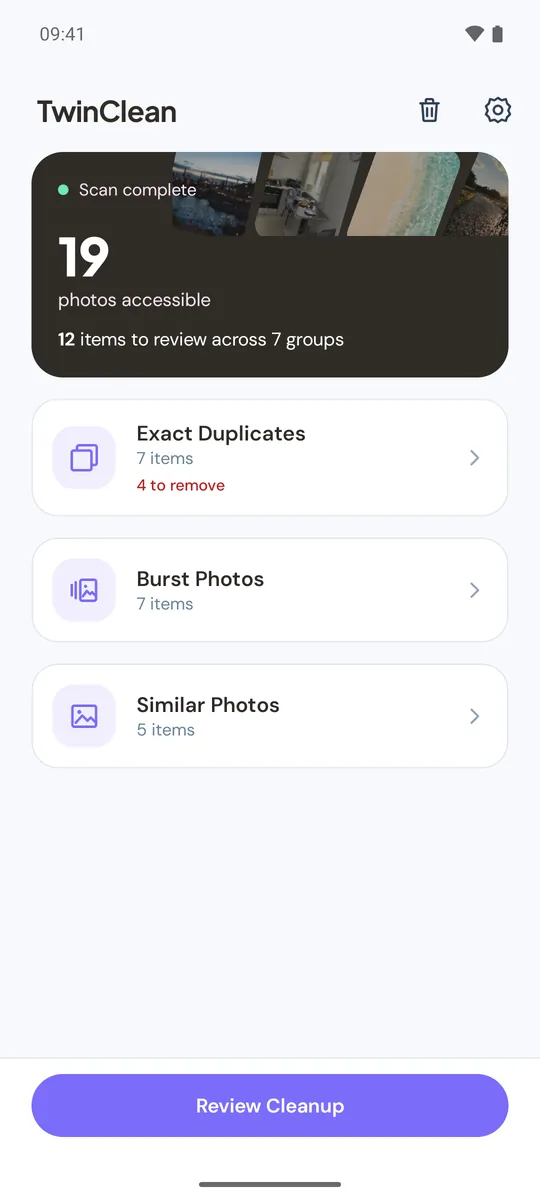
Each file is counted in one kind only. Only exact duplicates are called duplicates, because only they are the same file.
Same file, byte for byte
Photos and videos with identical content, whatever the file name, folder or date. The oldest item in your library is recommended to keep.
Taken seconds apart
Three or more shots in the same album, each taken within 2 seconds of the next, that look alike. Nothing is selected for you.
Look alike, not the same file
Shots of the same scene taken within 10 minutes of each other. TwinClean compares pictures, not meaning, so look before you remove.
Nothing moves until you have checked the list and confirmed in the Android dialog.
Four stages: indexing media, exact duplicates, burst photos, similar photos. Each kind opens as soon as it is ready.
Every group has a recommended keep, with the reason shown. Prefer another one? Keep it instead, and your choice stays.
Turn a category off to leave it out, check what is selected, then confirm. On Android 11 and newer, items go to the system trash.
All comparison happens on your device. Your photos and videos are never uploaded.
TwinClean asks for access to your photos and videos. On Android 14 and newer you can allow selected photos only; TwinClean then compares just those and tells you so.
Removed items go to the Android system trash and can be restored for up to 30 days. The Trash screen in TwinClean lists the items it moved, with Restore and Delete permanently.
There is no system trash, so removal is permanent. Nothing is pre-selected, and the confirmation says the action cannot be undone.
TwinClean works on Android 8 and newer, in 14 languages.